

Essentially, DTF Film oil return occurs when the film is not transferred (heat-pressed) to the fabric or other materials in a timely manner. After being left idle for a period of time, a greasy or wet-looking liquid begins to appear on the surface of the printed film. This oily substance can ruin the transfer effect, dull colors, and even affect adhesion.
As shown in the figure below, the film appears to behave like this with oil reflux:
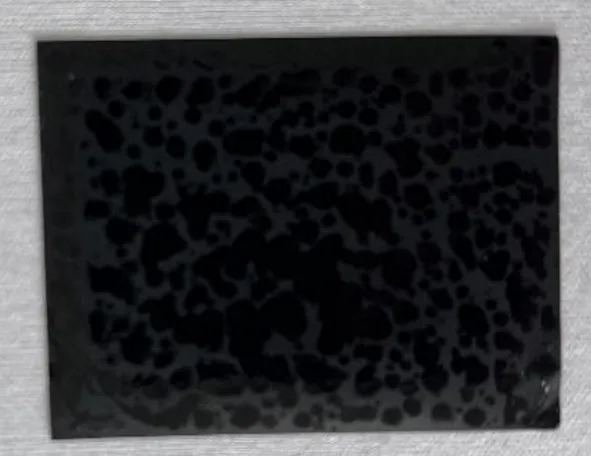
What Does DTF Film Oil Return Look Like?
The appearance of DTF Film oil return is quite distinctive. The surface of the film may show:
- Random glossy patches
- Oily-looking textures
- Slight surface bubbling
In conclusion, this is often seen on bold-colored films (black, red, yellow, blue), and can make prints appear splotchy or inconsistent after transfer.
Below is a list of the different “oil returns” that we have found in our tests, so please check to see if you have encountered them before.


What Causes DTF Film Oil Return?
There are a few key reasons why the DTF Film oil return phenomenon happens:
1. Inadequate Drying of the Film
If the film is not thoroughly dried after printing, residual adhesive or moisturizing components (such as hygroscopic additives) can absorb moisture from the air. Over time, this moisture can turn into visible oil-like droplets on the surface. The oily substance you actually see is the result of these chemical reactions.
2. Poor Oven Exhaust or Heat Settings
If your curing oven or heated box has poor airflow, a clogged exhaust, or is not at the proper temperature, it can result in too much moisture or chemicals in the film. This incomplete evaporation can cause DTF film to oil back after a delay. Since the entire process of DTF printing includes many post-heating reactions, similar chemical reactions can affect the product.
After the pattern is printed on DTF Film, hot melt powder needs to be added to cure it. And curing these powders will have a smell, so generally DTF ovens are equipped with an air vent. As shown in the picture below:

How to Prevent DTF Film Oil Return
Preventing the DTF Film oil return problem is all about optimizing the drying and curing process. Here are some practical steps:
Adjust the Curing Oven Temperature
Ensure that the DTF oven reaches the optimum temperature and maintains that temperature at all times. Temperatures that are too low can prevent moisture from fully evaporating, making the film susceptible to oiling back later. If you find that doing this doesn’t improve the situation, you might consider raising the temperature of the DTF oven a bit. The range is around 5 – 10 degrees, not too high.
Since different types of films have different baking temperature needs, you can increase the temperature appropriately to test and see if there is still oil return.
If you want a more in-depth look at how to use the oven, read on: How To Cure DTF Powder With Oven?
Check the Exhaust Pipe
Ensure that the exhaust pipe in your curing oven or drying box is:
- Not blocked
- Not folded or pinched
- Properly connected
In conclusion, good ventilation will expel excess steam and keep the film dry. This is the part where you can look at the surface of the baked film to see if there is any water mist left on the surface. A normal film surface is dry.

Don’t Delay Heat Pressing
If possible, emboss the DTF film onto the final material immediately after printing and curing. Prolonged exposure to air and humidity increases the risk of DTF Film oil return. Especially if you are in an area with high humidity.